| Patron Services | |
|---|---|
| Code | Description |
| Alt + 1 | Opens the Loans tab |
| Alt + 2 | Opens the Returns tab |
| Alt + 3 | Opens the Requests tab |
| Ctrl + Alt + D | Same as clicking Done; returns to the Patron Identification page to enable searching for another patron (see Selecting a Patron) |
| Manage Item Returns | |
|---|---|
| Code | Description |
| Ctrl + Alt + R | Return patron items |
| Alt + Ctrl + L | Opens the patron identification page (see Selecting a Patron) |
| Alt + Ctrl + C | Clears the list of returned items |
| Alt + Shift + X | Returns to the Alma homepage |
Please visit the Ex Libris Knowledge Center for more information on patron services-related operations.
By Alevtina Verbovetskaya in Alma on .
There are a lot of good features of Alma, our new library services platform going live in August 2020. However, one feature that is often cited as needing improvement is its UI, which relies heavily on mouse maneuvering and button clicking. To combat hand and wrist fatigue, consider using keyboard shortcuts!
| Code | Description |
|---|---|
| Shift + F2 | Go to homepage |
| Alt + W | Go to fulfillment checkout |
| Alt + R | Go to fulfillment discharge |
| Alt + P | Go to fulfillment task List |
| Alt + Ctrl + S | Go to scan in interface |
| Alt + Ctrl + U | Immediate job |
| / | Persistence search |
| Alt + Ctrl + F | Search in menu |
| Esc | Close search in menu |
| Alt + number | Tab navigation |
| Alt + \ | Pagination find |
| Alt + ] | Pagination last |
| Alt + [ | Pagination first |
| Alt + < | Pagination prev |
| Alt + > | Pagination next |
| Alt + B | Back button |
| Alt + N | Next button |
| Alt + E | Edit button |
| Alt + S | Save button |
| Alt + C | Cancel button |
| Alt + X | Clear button |
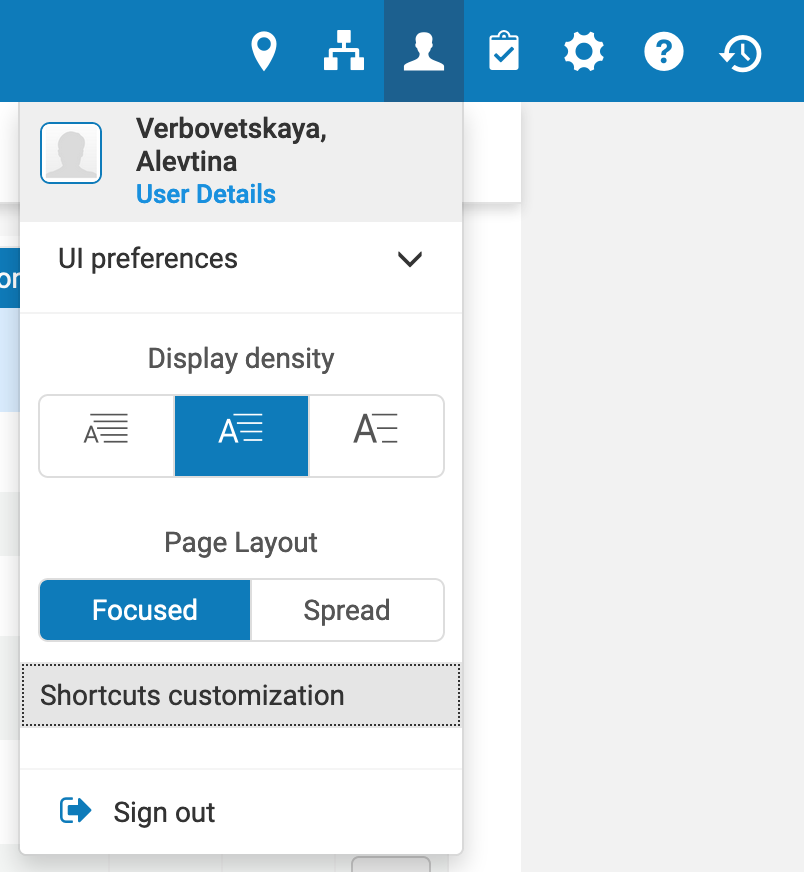
This list is available in your user profile, where you can also choose to deactivate specific hot keys (if, for example, they interfere with your other browser or OS shortcuts):
Many of the keyboard shortcuts available in Aleph are also available in the Alma Metadata Editor:
| General Navigation | |
|---|---|
| Code | Description |
| Alt + → | Next page |
| Alt + ← | Previous page |
| ↑ / ↓ | Moves the cursor up/down field by field in a record |
| → / ← | Moves the cursor to the right/left across the field, subfield, indicator, and content information |
| File Menu Alt + F | |
|---|---|
| Code | Description |
| Alt + N | New |
| Ctrl + Alt + S | Save draft |
| Ctrl + S | Save record |
| Ctrl + Alt + R | Save and release record |
| Ctrl + Shift + R | Release record |
| Ctrl + D | Delete record |
| Ctrl + Q | Exit (without saving any changes) |
| Edit Menu Alt + E | |
|---|---|
| Code | Description |
| F8 | Add field |
| Ctrl + F6 | Remove selected field row |
| F9 | Add sub-field |
| Ctrl + Alt + E | Enhance record |
| Ctrl + E | Expand from template |
| F4 | Generate author number |
| F6 | Split editor |
| F7 | Full screen |
| Ctrl + F | Open form editor |
| Esc | Close form editor |
| Ctrl + X | Cut |
| Ctrl + C | Copy |
| Ctrl + V | Paste |
| F3 | Link to suggested authority record |
| Tools Menu Alt + T | |
|---|---|
| Code | Description |
| Ctrl + Alt + H | Add holdings record |
| Alt + O | Add local portfolio (electronic resource) |
| Ctrl + Alt + O | Create PO Line and exit |
| Ctrl + M | Find matches to a bib record |
| Ctrl + I | View inventory on a bib record |
| Ctrl + Alt + H | Add another holding to bib record |
| Alt + I | Add item |
| Ctrl + Alt + B | From holding, view bib record |
| Alt + U | Update from bib record |
Please consult the Ex Libris Knowledge Center for up-to-date MDE menu and toolbar options.
